
The Systems Architecture of Containerized AI
Deep learning frameworks like PyTorch and Keras offer a high-level abstraction that makes building neural networks highly accessible. However, moving models from a Jupyter notebook into a robust, high-performance production environment requires stripping away these abstractions.
To design highly scalable AI infrastructure, engineers must understand the complete vertical stack: how tensor mathematics are lowered into hardware instructions, how Docker containers bypass OS isolation to reach physical GPUs, and how to optimize deployment images for production.
1. The Mathematics of Computational Lowering
Modern deep learning courses often teach convolutions through spatial intuition—a 3D filter sliding across an image grid. While conceptually helpful, this mental model is computationally disastrous if implemented directly.
The 7-Loop Fallacy
A naive batch convolution across 3D feature maps requires seven nested for loops (Batch Size, Output Channels, Output Height, Output Width, Input Channels, Kernel Height, Kernel Width). Executing nested loops sequentially on modern hardware causes extreme CPU/GPU cache thrashing, high-latency memory reads, and leaves SIMD vector units mostly idle.
Matrix Unrolling (im2col + GEMM)
Instead of loops, low-level execution engines like NVIDIA cuDNN lower convolutions into highly optimized General Matrix Multiplications (GEMM).
Using a technique called im2col (image-to-column), the backend extracts overlapping sliding windows from the input tensor and flattens them into a massive 2D matrix. The spatial filters are similarly flattened. The 7-loop operation is then executed as a single, highly optimized 2D matrix multiplication (Output = Weights × im2col(Input)), maximizing the throughput of GPU Tensor Cores.
Unified Architectural Algebra
This low-level tensor arithmetic reveals that standard Dense (Fully Connected) layers and Convolutional layers are not distinct operations under the hood. A Fully Connected layer is mathematically and computationally identical to a Convolutional layer where the kernel dimensions exactly match the input feature map’s spatial size ($K_H = H, K_W = W$). Recognizing this equivalence is what enables the deployment of Fully Convolutional Networks (FCNs) that can dynamically accept varying image resolutions at inference time.
2. The Host-Container Hardware Boundary
Deploying models requires containerization, but GPU containers frequently trigger the dreaded error: 'CUDA driver version is insufficient for CUDA runtime version upgrade'. This occurs due to a misunderstanding of the hardware boundary.
To maintain portability, NVIDIA software is split into two strict domains:
- On the Host (Physical Machine): The low-level C kernel module (
nvidia.ko) and the physical GPU driver. This interacts directly with the PCIe bus and is installed once per machine. - In the Image (Docker Container): The CUDA user-space runtimes (CUDA toolkit, cuBLAS, cuDNN, NCCL) and the Python frameworks.
The Compatibility Contract: The Host Driver must always be equal to or newer than the minimum driver version required by the CUDA Toolkit inside the Docker image. You cannot bring a newer CUDA runtime into a container if the host hardware driver is too old to understand its API calls.
3. OCI Runtime Hooks & Hardware Passthrough
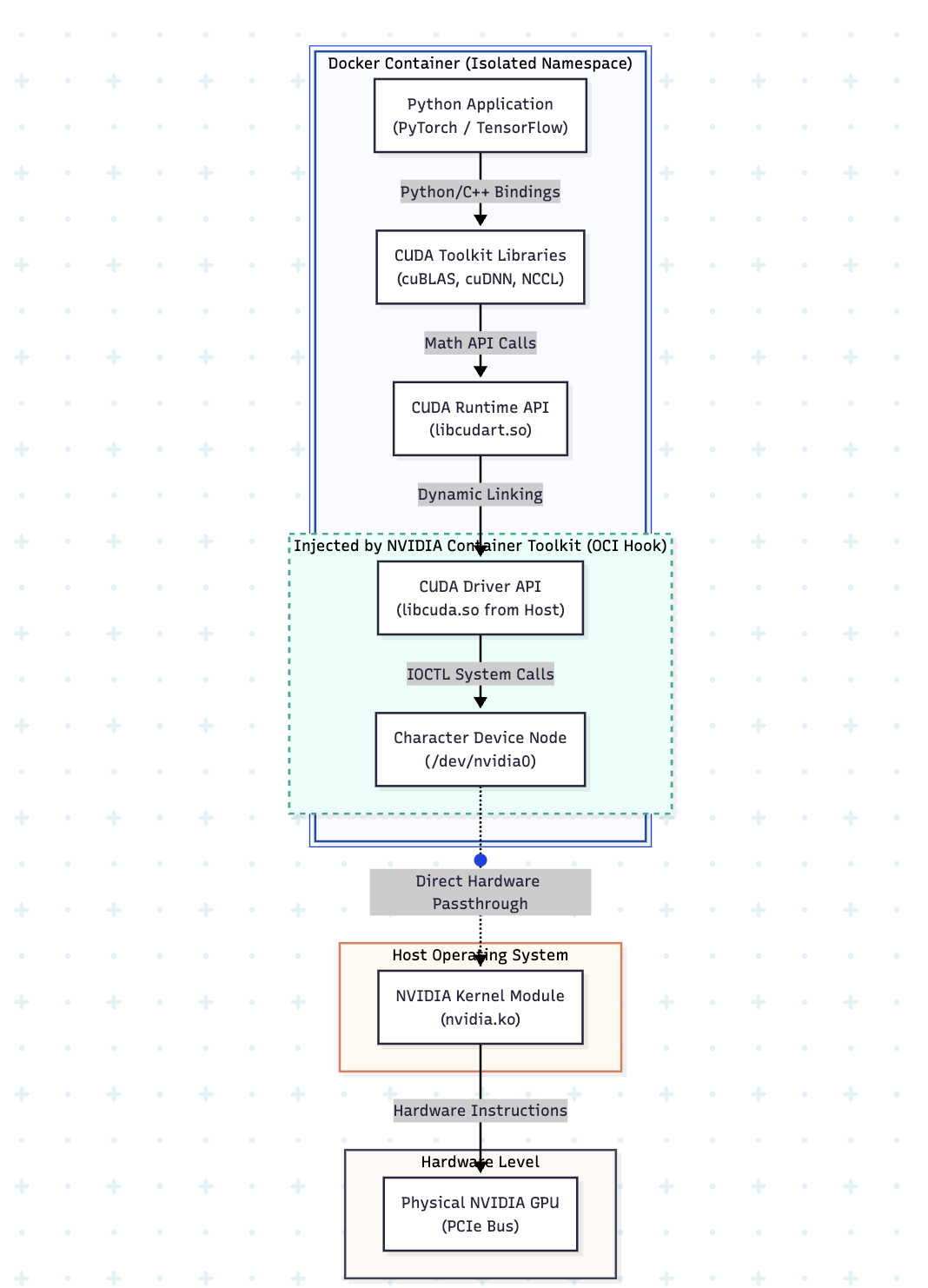
By default, Docker is designed to strictly isolate containers from host hardware. To allow PyTorch to access bare-metal silicon, we use the NVIDIA Container Toolkit.
(Insert your rendered Mermaid.js diagram here)
As illustrated above, passing the --gpus all flag to Docker triggers an OCI (Open Container Initiative) runtime hook. This hook intercepts the container creation process and performs two critical injections:
- Device Nodes: It dynamically exposes the host’s GPU character device files (e.g.,
/dev/nvidia0) inside the container’s isolated/devdirectory. - Driver Libraries: It bind-mounts the host machine’s user-space driver libraries (like
libcuda.so) directly into the container’s system library paths.
Because the device nodes map directly to the host hardware, operations inside the container run with zero virtualization overhead.
4. Production Engineering: Designing the GPU Dockerfile
A poorly written GPU Dockerfile results in bloated 15GB+ images and 20-minute build times. Architecting a production-grade image requires deterministic layer caching and deliberate base image selection.
NVIDIA provides three tiers of base images:
base: Bare minimum CUDA runtime API (~300MB).runtime: Includes cuBLAS, cuDNN, and NCCL. The standard default for running frameworks (~3GB).devel: Includes C/C++ headers and thenvcccompiler. Required only for building CUDA extensions from source (~10GB+).
The Multi-Stage Optimization Pattern
To leverage the compilation power of devel without carrying its massive footprint into production, utilize Docker’s layer caching and multi-stage builds.
Dockerfile
# STAGE 1: Dependency Caching & Compilation
FROM nvidia/cuda:13.0.0-devel-ubuntu24.04 AS builder
ENV DEBIAN_FRONTEND=noninteractive
RUN apt-get update && apt-get install -y --no-install-recommends python3.12 python3-pip git && rm -rf /var/lib/apt/lists/*

# Cache heavy ML dependencies FIRST to prevent rebuilds on code changes
COPY requirements.txt /tmp/
RUN pip install --no-cache-dir -r /tmp/requirements.txt

# STAGE 2: Lean Production Runtime
FROM nvidia/cuda:13.0.0-runtime-ubuntu24.04
COPY --from=builder /usr/local/lib/python3.12/dist-packages /usr/local/lib/python3.12/dist-packages
COPY . /workspace
WORKDIR /workspace
CMD ["python3", "inference_server.py"]
By copying requirements.txt strictly before the application code (COPY . /workspace), Docker caches the heavy multi-gigabyte PyTorch installation. Subsequent updates to your Python scripts will build in milliseconds, utilizing the cached layers.